
Level 314
HARDHow to solve Sand Loop level 314? Get instant solution for Sand Loop 314 with our step by step solution & video walkthrough. Sand Loop 314 tips and guide.
Play Sand Loop Now
Experience the puzzle challenge firsthand
Game Screenshots
Sand Loop Level Guides
Sand Loop Level 314: Mastering the Sunset River Valley
Introduction to the Landscape
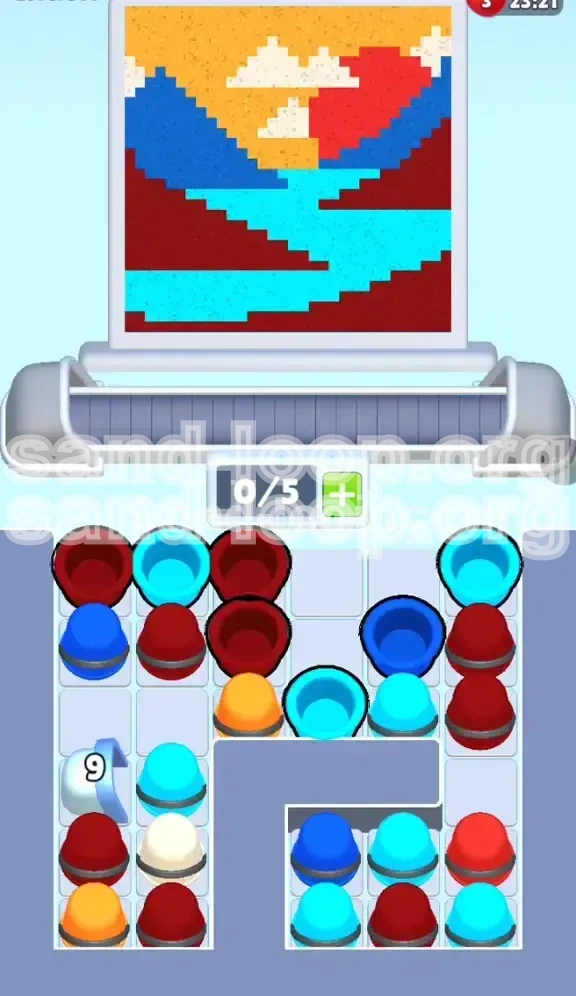
Welcome to Level 314, a stage that presents a serene "Sunset River Valley" artwork but delivers a chaotic logistical puzzle beneath the surface. At first glance, the target image appears straightforward: a vibrant blend of Cyan waters cutting through Dark Blue and Maroon mountains, set against a warm Yellow and Orange horizon with floating White clouds. However, do not let the artistic simplicity fool you. This level is fundamentally a test of inventory management and precision timing rather than artistic flair. The primary difficulty lies not in the complexity of the drawing, but in the restrictive physical layout of your paint supply tray, which is deliberately designed to bottleneck your progress.
The Core Challenge: Blocker Removal
Unlike standard levels where you simply match colors to the canvas, Level 314 is defined as a "Blocker Removal" stage. Your supply tray is cluttered with obstacles that prevent access to necessary paints. You are equipped with a 5-slot capacity, which is standard, but roughly 60% of your initial moves will be dedicated to clearing junk rather than painting. The game forces you to burn specific colors—ones you actually need later—just to excavate the pile and reach the buried colors required for the current layer. If you try to paint first and clear later, you will fill your slots with unusable trash and lose the level.
Strategic Overview
To conquer this stage, you must adopt a "mining" mindset. You are digging for tools, not just painting by numbers. The level is divided into two distinct phases: the Excavation Phase (clearing the "9" Bucket and the L-Shape wall) and the Execution Phase (layering the River, Mountains, and Sky). Success depends entirely on maintaining open slots in your inventory. If you go into this level aiming for speed, you will fail; precision and patience are your best allies here.
Palette Analysis
Before making a single move, memorize the palette distribution. The Cyan paint is the most abundant and critical, serving as the river. The Dark Blue and Maroon are secondary but heavily blocked. The Yellow (Sky) and White (Clouds) are high-risk colors because they are background elements that can easily be overwritten if applied out of order. Understanding which colors are "abundant" versus "scarce" dictates your entire clearing strategy.
Victory Conditions
Completing Level 314 requires a 100% fill rate to secure the stars. The "Danger Zones" are the pixel-perfect intersections between the Cyan river and the Maroon banks. A single misplaced pixel of Blue over a Cyan riverbank will result in a muddy brown mix that ruins your score. Furthermore, the White Clouds act as precision islands; painting the Yellow sky around them without encroaching on their space is the final technical hurdle of this level.
Primary Objectives and Mission Goals
Clear the Left Flank (The "9" Bucket)
Your immediate priority is the bottom-left corner of the supply tray. You will notice a large, grey concrete bucket marked with the number "9". This is a disposal unit, not a paint source. The game spawns this block to force you to waste moves. You must feed exactly 9 cups of "dummy" paint into this bucket to destroy it. Do not attempt to paint the canvas until this bucket is gone, or you will run out of inventory space and trap necessary colors behind the wall.
Breach the "L-Shape" Defense
Once the left side is clear, your next objective is the bottom-right quadrant. A massive L-shaped wall of grey concrete cuts off this area, hiding a cluster of essential Cyan and Dark Blue cups. You cannot access these paints by digging straight down. Instead, you must clear the columns to the left and above the wall. Using gravity is the key; clearing adjacent cups causes the stack to shift, eventually sliding the trapped paints out from behind the L-bracket and into your usable inventory.
Establish the River Foundation
With the path cleared, you must begin painting from the bottom up. The Cyan River acts as the anchor for the level. Before you touch the mountains or the sky, you must fully render the winding Cyan stream. This is because the river sits "under" the mountain pixels in terms of visual layering. If you paint the mountains first, you will likely miss the jagged edges of the river bank, forcing you to overwrite dark pixels with light ones later, which is technically difficult and wastes ink.
Execute the Mountain Layers
The mountains are divided into three distinct zones: the left Dark Blue ridge, the central Maroon ground, and the distant Red peak. The objective here is color distinction. You must separate the Maroon (lower ground) from the Red (distant peak) perfectly. The game often mixes these in the tray, so you must visually identify the correct cup by its shade before loading it. A failure to distinguish between Red and Maroon will result in a flat, depthless mountain range.
Finish with the Sky and Clouds
The final objective is the atmospheric background. This includes filling the upper 40% of the canvas with Yellow/Orange and inserting the White Clouds. This step is high-stakes because it happens last. If you have mismanaged your inventory and lack a White cup when the Yellow sky is partially done, you will be forced to either restart or paint over the sky later, risking the integrity of the cloud shapes. Securing a White cup *before* starting the sky fill is mandatory.
Maintain Slot Fluidity
Throughout all these objectives, the underlying mission is "Slot Fluidity." You must never sit on 5/5 full slots. Always keep at least one slot open (4/5 capacity) to allow for new cups to spawn from the dispenser. If you cap out your inventory, the conveyor belt stops, and you lose the ability to cycle the tray to find the colors hidden underneath. Managing this space is the difference between a smooth run and a hard restart.
Step-by-Step Walkthrough Instructions
Phase 1: The Garbage Disposal Routine
Start the level and do not look at the canvas. Look only at the bottom-left tray. Identify the "9" Bucket.
- Scan for Trash: Look for cups that are clearly useless for the bottom of the painting (e.g., White or Yellow cups).
- Feed the Beast: Tap these useless colors immediately. Do not load them onto the conveyor belt.
- The Countdown: Watch the number on the bucket decrease. Ensure you are feeding it constantly.
- Do Not Paint: Resist the urge to fill a single pixel on the canvas until that bucket explodes and vanishes.
- Gravity Shift: Once the bucket is gone, the column above it will drop down, revealing the Maroon cups you need for the ground.
Phase 2: Excavating the Cyan River
With the left side open, identify the Cyan cups. They are likely buried in the middle columns.
- Clear the Verticals: Use single taps to clear vertical columns of junk sitting on top of the Cyan cups.
- Load the Belt: Once you have access to Cyan, load one onto the belt.
- Trace the Flow: Start painting the river from the bottom-center upwards. Follow the jagged "stair-action" pattern of the pixel art.
- Hold on Edges: When you reach a river bank (where Cyan meets Maroon), stop. Do not overlap.
- Check the Trap: Keep an eye on the L-Shape wall in the bottom right. As you use Cyan, the stack should shift, potentially freeing more Cyan or Dark Blue.
Phase 3: The Mountain Ridge Protocol
Now that the river is established, switch focus to the Dark Blue (left) and Maroon (right) mountains.
- Identify the Ridge: Look for the Dark Blue cups. Use them to paint the left-side mountain range.
- The Maroon Fill: Switch to Maroon for the bottom-right ground.
- Avoid Mixing: Be incredibly careful not to let Dark Blue touch the Cyan river. If you accidentally place a Dark Blue pixel next to a wet Cyan pixel, it creates a dark border that ruins the crisp water line.
- Manage the Pile: As you use these colors, you will slowly be dismantling the L-Shape wall obstruction in the tray.
Phase 4: The Sky-High Maneuver
This is the most dangerous part of the level. You are moving to the top 40% of the screen.
- Secure the White: Before you load a Yellow cup, scroll through your entire tray. Do you see a White cup? If yes, note its position. If no, you need to dig for it or wait for it to spawn.
- Start the Yellow: Begin filling the sky background.
- The Cloud Gap: About 50% through the sky, you will hit the "Cloud Zone."
- Timing the Switch: You need to pause the Yellow fill to inject the White cloud.
- The Slot Shuffle: Load the White cup onto the belt *between* two Yellow cups.
- Placement: Paint the White cloud pixels quickly, then immediately switch back to Yellow to finish the sky. Do not let the Yellow dry around the cloud gaps.
Phase 5: Cleanup and Final Polish
The painting is done, but the tray is likely a mess.
- Scan for Missed Pixels: Look closely at the Red mountain peak. Did you paint it, or is it still Maroon?
- Edge Smoothing: Check the river banks. Are there any "stray" Dark Blue pixels sitting in the water? Tap them to fix.
- Empty the Tray: If the level doesn't end immediately, you might have leftover single pixels. Use your remaining slots to dump trash and match these final pixels.
- Star Check: Ensure the fill percentage is at 100%.
Optimal Color Processing Order
1. The Excavation Colors (Trash & Prep)
The first "color" you process is technically whatever is blocking the "9" Bucket. Usually, this is Yellow or White. You process these not to paint, but to delete. Do not feel bad about "wasting" these colors early. Processing them is an investment in opening the board. You are effectively trading early resources for board control.
2. The Foundation Colors (Cyan & Maroon)
Once the board is open, the priority is Cyan (River) and Maroon (Ground). These are your base layers. Processing Cyan first is usually safer because it is the most visually distinct element. If you paint the Maroon ground first, you might lose the visual guide for the river's edge. By painting the Cyan river first, you create a clear boundary for the Maroon paint to bump against.
3. The Structural Colors (Dark Blue & Red)
Next comes the Dark Blue (Left Mountain) and the Red (Distant Peak). These provide the framing for the scene. Process Dark Blue before Red, as the Blue occupies more visual space and defines the left boundary of the canvas. The Red peak is small and isolated, so it can be treated as a detail color processed near the end.
4. The Atmospheric Colors (Yellow & White)
The Yellow Sky and White Clouds must be processed last. This is because they sit on top of everything else. If you process the sky first, you run the risk of accidentally "erasing" the mountain peaks with yellow paint if your hand slips. Furthermore, the White clouds are technically "negative space" within the Yellow sky. You must process the Yellow *up to* the cloud, then process the White, then finish the Yellow. It is a sandwich technique.
5. The "Buffer" Strategy
When processing the order, always leave a 1-slot buffer between color families. For example, do not transition directly from Cyan to Dark Blue if your tray is cluttered. Clear a slot, let the cups settle, and then load the next color. This prevents the "loading jam" where a cup gets stuck halfway onto the belt because the physics engine is confused by a full tray.
6. The "Rhythm" Method
The optimal order creates a rhythm: Dig -> Paint River -> Paint Ground -> Paint Mountains -> Paint Sky. If you find yourself jumping back and forth (e.g., painting a bit of sky, then a bit of river, then back to sky), you have broken the optimal order. This "jumping" wastes movement time and increases the chance of placing the wrong color in the wrong place. Stick to the linear flow from bottom to top.
Pro Tips and Strategic Advice
Mastering the "Junk" Call
Learn to instantly identify "Junk" cups versus "Keep" cups. In Level 314, a White cup appearing in the first 10 seconds is Junk. A Yellow cup appearing in the first 10 seconds is Junk. Do not read the names of the colors; read the visual needs of the current layer. If you are painting the bottom of the screen (Dark/Maroon), anything bright (Yellow/White) is automatically trash. Train your brain to make this distinction in milliseconds to keep the flow moving.
The "L-Shape" Gravity Glitch
There is a physics quirk in this level regarding the L-Shape wall. Sometimes, cups behind the wall won't drop even if the space above them is clear. To fix this, tap the cup *directly* to the left of the wall. This lateral pressure often forces the physics engine to recalculate the gravity, causing the stuck cups to slide into the open space. Use this "nudge" technique instead of frantically tapping the blocked cups.
The Cloud Reservation Strategy
Never trust the RNG (Random Number Generator) to give you a White cup exactly when you need it. If you see a White cup in the tray—even if you are 50 moves away from painting the sky—pick it up and "reserve" it. Keep it on your conveyor belt or in a slot. Think of it as holding a VIP ticket. It is better to have a White cup taking up a slot for 30 seconds than to need one at the end and have it spawn under a pile of unmovable garbage.
The "Sky" Trap Prevention
The most common fail state in this level is the "Sky Trap." This happens when you fill the sky with Yellow, but leave tiny 1-pixel gaps for clouds, and then run out of White cups. To prevent this, paint the sky in sections. Paint the top 20% (pure Yellow), then stop. Ensure your White cups are ready. Then paint the middle section, weaving in the clouds. Leave the bottom 10% of the sky (near the mountains) until the very end, as this is the highest risk area for color bleeding.
Using the Iron Bucket Wisely
Once the "9" Bucket is gone, you might see other Iron Buckets appear or residual disposal mechanics. Don't just dump into them randomly. Use the disposal mechanic to "fix" your tray if you have too many of one color. For example, if you have 3 Cyan cups but the river is 90% done, dump the excess Cyan into a bucket to make room for the Red you need. This "palette correction" is essential for high-level play.
Visual Calibration: Red vs. Maroon
On smaller screens (mobile devices), the Red mountain peak and the Maroon ground look almost identical. Before you make a move, zoom in (if possible) or pause to check the target image. The Red is distinct and isolated; the Maroon is the base texture. If you accidentally use Maroon on the Red peak, the color will look muddy and dark. If you use Red on the Maroon ground, it will look like a glowing sore thumb. Double-tap the target preview to refresh your color memory before switching between these two specific shades.
Solutions for Common Stuck Scenarios
Stuck Scenario: "The River is Blocked"
Symptom: You are trying to paint the Cyan river, but you can't reach the next pixel because the game says it's blocked or the paint isn't taking.
Cause: You are trying to paint the river *over* the mountain layer. The game logic requires the "ground" pixels to be filled first, or there is a misalignment in the "stair" pattern.
Solution: Switch to Dark Blue or Maroon. Paint the mountain pixel that is "under" or "next to" the river pixel you want. Often, filling the adjacent ground pixel unlocks the flow for the river pixel. Also, check that you aren't trying to fill a "Cloud" pixel with Cyan; the clouds float above the river and must remain white.
Stuck Scenario: "Inventory Gridlock (5/5 Slots)"
Symptom: Your tray is full, you can't load new cups, and you can't find any place on the canvas to use the colors you have.
Cause: You picked up too many "future" colors (like White or Yellow) too early. You are hoarding.
Solution: You must dump. Look for an Iron Bucket or, if available, a trash disposal area on the canvas (edges of the screen sometimes allow dumping, though this is level-dependent). If no bucket is available, you must bite the bullet: find a throwaway pixel on the canvas (an area that will be covered up later, like the corner of the sky) and dump a cup of paint there to free up the slot. It is better to waste one pixel than to restart the whole level.
Stuck Scenario: "The Cloud Disappeared"
Symptom: You painted a White cloud, continued with the Yellow sky, and now the cloud is gone or yellow.
Cause: You painted over it. The "sand" mechanics in this game layer pixels. If you paint Yellow over White, it becomes Yellow.
Solution: This is usually irreversible unless you have an "Undo" power-up. Without power-ups, you have to repaint the White cloud. This requires you to have a White cup *now*. If you don't have one, you are stuck. To prevent this, always pause the conveyor belt after placing a cloud to ensure the pixel registered before loading the next Yellow cup.
Stuck Scenario: "Tray Won't Drop"
Symptom: You cleared the column, but the cups behind the L-Shape wall won't drop down.
Cause: Physics engine hang-up or a single pixel of "garbage" blocking the slide.
Solution: Stop tapping the column you want to drop. Instead, tap the *vertical* column immediately to the left of the stuck stack. This usually jostles the stack enough to trigger the gravity drop. If that fails, rapidly tap the "conveyor belt" button (or load/unload a cup) to force a physics refresh.
Stuck Scenario: "Wrong Color Loaded"
Symptom: You have Cyan on the belt, but you need Dark Blue, and the Cyan is blocking the dispenser.
Cause: Loading order mistake.
Solution: If the cup is on the belt but not yet in the "active" hand, you can sometimes swap it by tapping another cup. If it is in the active hand, you must paint a pixel of that color (Cyan) immediately to get rid of it, or find a trash bucket. Never paint a wrong color just to "get rid of it" on the main canvas; always look for a dumpster or a non-critical area.
Speed Run and Shortcuts Strategy
The "Tap-Drag" Technique for the River
For advanced players looking to shave seconds off the clock: Do not tap individual pixels for the river. The "Sand Loop" engine allows for a "swipe" or "drag" input if the pixels are contiguous. Once the river path is clear, click and hold your mouse/finger on the first river pixel and drag along the center of the river. The game will register a rapid-fire sequence of paints. This turns a 30-second process into a 3-second process. Warning: This requires high precision; one slip into the mountain edge ruins the combo.
Pre-loading the Conveyor Belt
Don't wait for the belt to be empty to load the next cup. As your current cup is being used (the animation of the sand pouring), immediately tap the next cup you need in the tray. The game queues this action. By the time the current pixel is filled, the next cup is already loaded onto the belt. This eliminates the 1-2 second delay between every single stroke, saving massive amounts of time over the course of a 500+ pixel level.
The "Bulk Dump" Macro
During the "9" Bucket phase, don't tap trash cups one by one slowly. If you see a stack of 3 Yellow cups in the left corner, tap them in a rapid rhythm: Tap-Tap-Tap. The game's physics accepts rapid inputs. This clears the blocker faster, getting you to the "painting" phase sooner. The faster you clear the "9" bucket, the faster the Maroon cups drop, which is the bottleneck for the rest of the level.
Skipping the "Perfect" Cloud Edges
Perfectionists lose time on clouds. If you are speed running, accept "jagged" cloud edges. The star rating in Sand Loop often prioritizes *completion* over *pixel-perfect edge smoothing* (unless it's a specific "Precision" level type). Fill the general shape of the cloud with White. If the edges are a bit blocky or if you slightly overlap into the Yellow, it usually still counts as a "Star" provided the fill percentage is high enough. Don't restart for a 1-pixel cloud bleed.
Memorizing the Spawn Patterns
The tray in Level 314 is semi-randomized but follows weight patterns. Dark Blue and Cyan spawn in clusters. Once you clear the left side, you know the right side (behind the L-Shape) is mostly Red/Cyan. Don't hunt for colors; predict them. If you need Red, go straight for the bottom-right excavation zone. Don't waste time scanning the top rows; they are usually filled with high-volume trash (Yellow/White) during the early game.
Utilizing the "Restart" Rule
If your speed run goes wrong (e.g., you paint the sky too early and trap yourself), do not try to fix it. It is faster to force-quit the level and restart than to fumble through a broken inventory state for 5 minutes. A "clean" run with a restart at 30 seconds is faster than a "salvage" run that takes 3 minutes. Know when to cut your losses.